
🪟 Understanding Microsoft Volume Activation
In the world of IT administration, deploying operating systems and software suites across an organization is just the first step. Ensuring that every instance is properly licensed and activated is a critical, ongoing task. Microsoft provides a framework for this called Volume Activation, designed to simplify the management of licenses for products like Windows and Office across a fleet of computers. This framework is essential for any organization that is not purchasing computers with pre-installed OEM licenses for every user.
Volume Licensing is a cost-effective and manageable way to acquire Microsoft software for multiple computers. Instead of buying individual retail copies, an organization purchases licenses in bulk. However, these licenses still need to be activated to verify they are genuine. Manually entering a unique key for hundreds or thousands of machines is impractical and inefficient. This is where automated activation methods come into play.
The two most established methods for volume activation are the Key Management Service (KMS) and the Multiple Activation Key (MAK). Each is designed for different organizational needs, network environments, and administrative preferences. A third, more modern method, Active Directory-Based Activation (ADBA), builds on the principles of KMS but offers even greater simplicity for specific scenarios. Choosing the right strategy is not just a technical decision—it directly impacts administrative overhead, security, and user experience.
This guide provides a comprehensive breakdown of KMS, MAK, and ADBA. We will explore how they work, their respective pros and cons, and the decision-making framework IT professionals should use to select the optimal model for their organization.
📊 What is a Multiple Activation Key (MAK)?

A Multiple Activation Key (MAK) operates on a straightforward, one-time activation model. When you purchase a block of volume licenses, Microsoft provides a MAK with a predetermined number of activations associated with it. Think of it as a prepaid key. Each time you use the MAK to activate a computer, the central Microsoft activation service decrements your remaining activation count.
This activation process is a direct transaction between the client machine and Microsoft's servers over the internet. Once a device is activated with a MAK, it is permanently activated and does not need to communicate with Microsoft again for re-verification, unless significant hardware changes occur (like a motherboard replacement), which might trigger a new activation requirement.
How MAK Activation Works:
- Installation: You install a volume-licensed edition of Windows or Office on a client machine.
- Key Entry: The MAK is entered on the client machine, either manually or through a deployment script or tool like the Volume Activation Management Tool (VAMT).
- Activation:The client computer contacts Microsoft's activation servers over the internet.
- Validation: Microsoft's servers validate the MAK and decrement the available activation count for that key. If the key is valid and has activations remaining, an activation confirmation is sent back to the client.
- Permanent Activation: The machine is now considered permanently activated.
Advantages of MAK:
- Simplicity: The concept is easy to understand and implement, especially for smaller organizations without a dedicated IT team.
- No Local Infrastructure: It requires no on-premises host server or specific network configuration. As long as a computer can connect to the internet, it can be activated.
- Ideal for Isolated/Mobile Devices: It's the perfect solution for devices that are frequently off the corporate network, such as laptops for remote workers or field staff, as they only need to connect once to be activated.
Disadvantages of MAK:
- Finite Activations: You must carefully manage your activation count. If you run out, you need to contact Microsoft to request an increase, which can be a bureaucratic process.
- Reimaging Challenges: Every time a machine is reimaged, it consumes a new activation. This can quickly deplete your count in environments with frequent OS redeployments.
- Management Overhead: Tracking which machines are tied to which MAK (if you have multiple) and monitoring the activation count requires diligent bookkeeping, often using the Volume Activation Management Tool (VAMT).
🔐 How Does a Key Management Service (KMS) Work?

The Key Management Service (KMS) is a role-based activation method that operates on a client-server model. Instead of each computer activating directly with Microsoft, you designate a machine on your local network as the KMS host. This host obtains a special KMS Host Key from Microsoft's Volume Licensing Service Center (VLSC) and activates itself once with Microsoft's servers.
Once the KMS host is live, it listens for activation requests from other clients (Windows and Office) on the network. When a KMS client starts up, it automatically searches for the KMS host using DNS records (_vlmcs._tcp). It then requests activation from the host. The client machine's activation is not permanent; it's a lease that lasts for 180 days. To remain activated, the client must reconnect to the KMS host at least once every 180 days to renew its lease. If it fails to do so, it will enter a grace period and eventually a reduced functionality mode.
The KMS Activation Threshold:
A crucial aspect of KMS is the concept of activation thresholds. A KMS host will not begin activating clients until a minimum number of clients have requested activation. This is to prevent the misuse of volume licensing in very small environments.
- For Windows Server: The threshold is 5 clients.
- For Windows Client (Desktop): The threshold is 25 clients.
- For Microsoft Office: The threshold is 5 clients.
Until these minimums (the 'N-count') are met, clients will not activate. The KMS host keeps a count of the machines requesting activation, and once the threshold is crossed, it starts activating all clients that check in.
Advantages of KMS:
- Automated & Scalable: Once set up, the process is entirely automated. New machines on the network will find the KMS host and activate themselves with zero manual intervention. It's ideal for large-scale deployments.
- No Depleting Count: You are not managing a finite number of activations. As long as machines can contact the KMS host, they can activate and reactivate as needed, which is perfect for environments where machines are frequently reimaged.
- Low Management Overhead (Post-Setup): After the initial configuration, the system largely manages itself. There's no need to track individual activations.
Disadvantages of KMS:
- Requires On-Premises Infrastructure: You must have a machine (either physical or virtual) that can serve as the KMS host. This machine must be accessible on the network.
- Connectivity Requirement: Clients must be able to connect to the corporate network at least once every six months to renew their activation. This can be problematic for devices that are permanently off-site.
- Activation Thresholds: KMS is not a viable option for small networks with fewer than 25 client operating systems that need activation.
💡 The Modern Alternative: Active Directory-Based Activation (ADBA)
While KMS and MAK have been the mainstays of volume activation for years, Microsoft introduced a more streamlined method with Windows Server 2012: Active Directory-Based Activation (ADBA). ADBA allows you to activate machines through their membership in an Active Directory domain, making it the simplest method for qualifying environments.
With ADBA, you install the Volume Activation Services role on a Domain Controller and add your KMS Host Key (now referred to as a CSVLK) through the wizard. This key is used to create an Activation Object (AO) within the Active Directory forest. Once the AO is created, any domain-joined Windows or Office client running a supported version will automatically query Active Directory for this object upon startup. If the client's GVLK (Generic Volume License Key) matches the AO, the machine is transparently activated.
Key Features of ADBA:
- No Dedicated Host: Unlike KMS, ADBA does not require a dedicated host server. The activation object is replicated across all Domain Controllers in the forest, providing inherent redundancy and high availability.
- No Network Lookups: Clients do not need to perform DNS lookups to find a server. Activation is tied to domain membership, making the process smoother and more reliable.
- Instant Activation: As soon as a machine joins the domain, it activates. There are no activation thresholds or counts to worry about.
ADBA vs. KMS:
For organizations with a modern Active Directory infrastructure, ADBA is almost always superior to KMS.
- Simplicity: ADBA setup is a one-time, wizard-driven process that is far simpler than configuring a KMS host, creating DNS records, and managing firewall ports.
- Resilience: Because the Activation Object is replicated, you don't have a single point of failure as you might with a standalone KMS host.
- Requirements: The primary limitation of ADBA is that it only works for clients that are domain-joined. If you have legacy systems, workgroup machines, or devices in a DMZ that are not on the domain, they cannot use ADBA and will still require KMS or MAK activation. The client OS must also be Windows 8/Server 2012 or newer.
Practical Guidance: If your environment is fully domain-joined and runs modern operating systems, ADBA should be your default choice. You can even run ADBA and KMS concurrently to support a mixed environment of domain-joined and non-domain-joined machines.
✅ Choosing Your Model: MAK vs. KMS vs. ADBA
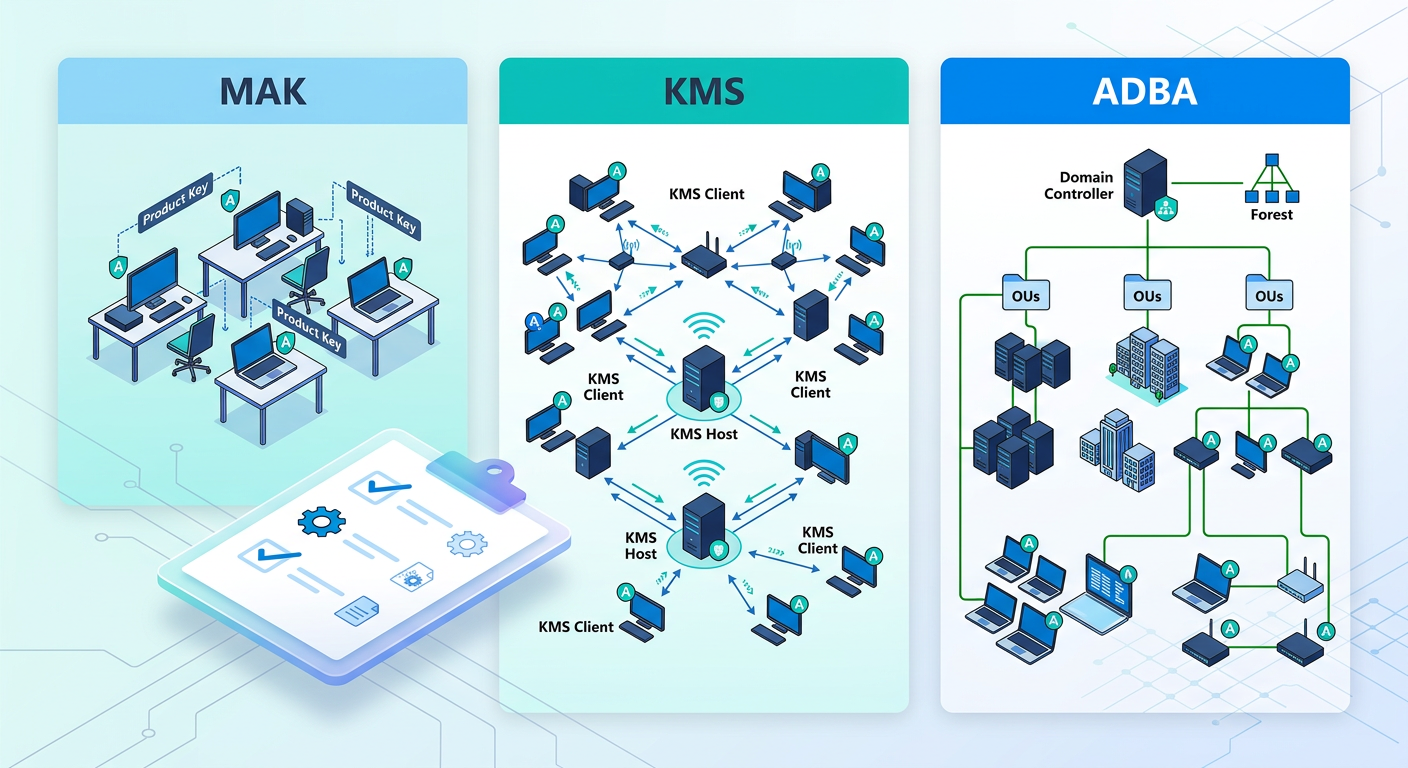
Making the right choice depends entirely on your organization's specific technical and operational context. There is no single 'best' answer, only the best fit for your environment. Use the following criteria as a decision-making framework.
Consider Your Fleet Size and Composition:
- Small Business (Under 25 Computers): MAK is the clear winner here. You fall below the KMS activation threshold, and the simplicity of direct activation with Microsoft is ideal. The management overhead of tracking a small number of activations is minimal.
- Medium to Large Business (25+ Computers): This is the core battleground for KMS vs. ADBA. If your network is fully domain-joined with modern operating systems, ADBA is the more elegant, resilient, and manageable solution. If you have a mix of domain-joined and non-domain-joined machines, or older legacy systems, a hybrid approach is best. Use ADBA for modern domain clients and a KMS host for the rest.
- Organizations with Remote/Disconnected Users: If a significant portion of your workforce is remote and rarely connects to the corporate network via VPN, MAK activation is the most reliable choice for their devices. A laptop activated with MAK will remain activated regardless of its location or network status.
Analyze Your Network Infrastructure:
- Single, Connected Network: An environment where all machines are on-site and connected to the same LAN is a perfect candidate for KMS or ADBA.
- Segmented or Complex Networks: If you have isolated labs, DMZ servers, or workgroup machines, you'll need a solution for them. A KMS host can be configured to serve these, but you may need to adjust firewall rules. Alternatively, using MAK keys for these specific segments can simplify things by isolating their activation process from the main corporate network.
- AD Infrastructure: The presence and health of your Active Directory is the deciding factor for ADBA. You need a Windows Server 2012 or newer schema level. If your organization doesn't use Active Directory or is on a much older version, ADBA is not an option.
Factor in Administrative Overhead:
- MAK Administration: Requires diligent use of the Volume Activation Management Tool (VAMT) to track activation counts, request more activations, and manage keys. It is a more 'hands-on' process.
- KMS Administration: Requires initial setup of a host, DNS, and firewall. After that, it's largely 'set-and-forget,' with occasional checks to ensure the host is running and the count is healthy.
- ADBA Administration: This is the lowest-overhead option. After a one-time setup that takes minutes, there is virtually no ongoing management required.
⚠️ OEM vs. Retail vs. Volume Licensing: A Note on Sourcing
It's crucial to distinguish between activation methods (KMS, MAK) and the license channels through which software is acquired. The method you use to activate is determined by the license you purchase.
- OEM (Original Equipment Manufacturer): This license is pre-installed by hardware manufacturers like Dell, HP, or Lenovo. The license is tied to the specific device it came on and is not transferrable. These licenses are activated by the manufacturer and are not intended for end-user purchase or use in custom-built machines. CRITICAL: Standalone OEM keys sold online are not legitimate for end-user purchase or use and violate Microsoft's distribution terms. Acquiring licenses this way for your organization is non-compliant.
- Retail (FPP - Full Packaged Product): This is the license you buy in a box or as a digital download from a retailer. It comes with a single unique activation key and can be transferred to a new computer. It is not designed for mass deployment and is managed on a per-machine basis.
- Volume Licensing: This is the channel for organizations. When you enter a Volume License Agreement with Microsoft, you gain access to Volume License media and the corresponding activation methods discussed in this article: MAK and KMS/ADBA. This is the only legitimate path for deploying and activating Windows or Office at scale within an organization.
In summary, KMS and MAK are not license types themselves; they are the tools provided under a Volume License agreement to make managing the activation of those licenses feasible. Your organization must first have a valid Volume License Agreement in place to use them.
📊 Comparison
| Feature | MAK (Multiple Activation Key) | KMS (Key Management Service) | ADBA (Active Directory-Based Activation) |
|---|---|---|---|
| Best For | Small fleets, remote/isolated devices | Large (25+) on-premise networks | Modern, domain-joined networks |
| Activation Method | One-time, direct with Microsoft | Lease-based, via local host | Automatic, via AD domain membership |
| Infrastructure | None (Internet access only) | Requires a dedicated KMS host server | Requires AD infrastructure (WS 2012+) |
| Scalability | Low; limited by key count | High; unlimited client activations | Very High; integrated with AD |
| Connectivity | Internet access needed once | Must connect to LAN every 180 days | Must be a member of the domain |
| Management | Manual tracking of key counts (VAMT) | Set-and-forget after initial setup | Virtually no management after setup |
| Offline/Isolated Nets | Excellent; activate once, then disconnect | Poor; requires regular network check-in | Not possible; requires domain connection |
| Thresholds | None | Yes (25 for Windows client, 5 for Server) | None |